Image File Formats
A file format decides what survives the trip from sensor to disk. Every pixel exactly, or a smaller approximation. JPEG shrinks photos by discarding fine detail; PNG keeps all pixels intact.
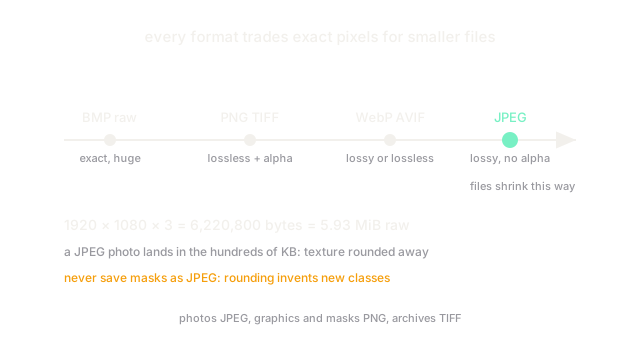
Why Does This Exist?
The raw grid is huge. A single 1920 by 1080 color photo is over six million values, and a dataset of those would never fit on disk or download in reasonable time. Formats exist to package the grid smaller, and they disagree about what may be sacrificed: exact values, invisible detail, transparency, or animation.
Picking blind corrupts pipelines. Labels saved as JPEG come back with invented pixels around every boundary. Photos archived as BMP waste orders of magnitude of disk. This page maps the common formats to their contracts so the choice is deliberate. How many shades each pixel can hold in the first place is bit depth; what the grid itself promises is image fundamentals.
Think of It Like This
Shipping a painting three ways
You must mail a painting across the country. Choice one: a perfect glass-plate sandwich, heavy and huge, arriving molecule for molecule. That is BMP or raw. Choice two: a skilled copyist repaints it slightly smaller, matching every brushstroke the eye checks and fudging texture nobody inspects. That is JPEG. Choice three: you fold it with clever origami that unfolds back to the exact painting. That is PNG.
The copyist version can never become the original again, but it ships for a fraction of the postage. The analogy stops here: real codecs exploit math about human vision, not a copyist's judgment.
How It Actually Works
Every format stores the same grid plus a header describing it. They differ in the codec between the grid and the bytes.
Lossy formats discard readonly detail
JPEG converts blocks of pixels to frequencies, then quantizes away the high frequencies eyes barely register. Quality knobs choose how much dies. Text edges and sharp boundaries ring with halos, and each re-save compounds the damage. JPEG has no transparency channel and suits photos, never line art or labels.
Lossless formats keep every value
PNG compresses with prediction plus DEFLATE and restores every pixel bit-for-bit, including an alpha channel for transparency. Files run larger than JPEG for photos but smaller for screenshots and diagrams with flat fills. TIFF is the archival cousin: flexible tags, lossless options, huge files. BMP stores the grid nearly raw and serves mostly as a cautionary tale about size.
The specialists
GIF holds at most colors with 1-bit transparency and animation, fine for tiny graphics, wrong for photos. WebP and AVIF are modern codecs covering both lossy and lossless with transparency and animation; support is broad now but still worth checking on your oldest target. RAW files are sensor dumps with 10 to 14 bits per photosite for editing headroom, not delivery.
Worked example: what JPEG is up against
A 1920 by 1080 RGB photo holds values, one byte each at 8 bits: about MiB of raw grid. A JPEG photo typically lands in the hundreds of kilobytes, many times smaller than the raw grid, by permanently rounding away fine texture. Reopen and re-save it ten times and the rounding stacks into visible mush around every edge.
Code
width, height, channels = 1920, 1080, 3raw = width * height * channels # 8-bit: one byte per valueprint(raw, "bytes of raw grid")print(round(raw / 1048576, 2), "MiB before any codec")# -> 6220800 bytes of raw grid# -> 5.93 MiB before any codecWatch Out For
Saving masks or labels as JPEG invents classes
JPEG's block rounding creates intermediate pixel values along every boundary. A binary mask with values comes back sprinkled with s and s, and training ingests them as new classes. Masks, depth maps and any annotation always ship PNG or TIFF.
Converting PNG to JPEG silently drops the alpha channel
JPEG has no transparency, so translucent regions flatten onto black (or white, depending on the tool) with no warning. Logos and overlays gain ugly dark fringes. Check channel count after every conversion and keep a lossless master of anything with alpha.
The Quick Version
- Formats package the same pixel grid with different sacrifice contracts: exact, approximated, or raw.
- JPEG is lossy and photo-suited, with no transparency and damage that compounds on re-save.
- PNG and TIFF are lossless; PNG adds transparency and suits graphics, TIFF suits archives.
- GIF caps at 256 colors; WebP and AVIF cover both modes but need a support check.
- A 1080p photo is 5.93 MiB raw, which is exactly the problem every codec is solving.