Image Fundamentals
A digital image is a grid of numbers where each cell records how much light landed there. Resolution, channels and bit depth decide how much of the scene those numbers can hold.
Why Does This Exist?
Every vision model eats numbers, never pictures. A camera sensor measures light, an analog-to-digital converter turns each measurement into an integer, and the result is an array your code can slice, resize and feed to a network. If you do not know what that array promises, you will misread shapes, blow up memory, or normalize away real signal.
The three promises are resolution (how finely the scene is sampled), channels (which light measurements each cell holds), and bit depth (how many distinct values each measurement can take). This page defines the container. Its neighbours define the parts: how pixels address the grid, how bit depth sets the shade steps, what color channels mean in RGB and grayscale, and where the numbers come from in image formation.
Think of It Like This
A mosaic mural made of numbered tiles
Picture a mural built from small square tiles. Each tile has one fixed color, the mural is so many tiles wide and so many tall, and the shop sells paint in a fixed set of shades.
The tile grid is the resolution, the number of paint layers per tile is the channel count, and the number of shades the shop stocks is the bit depth. Step far back and the tiles blend into a face. Press your nose to the wall and the face vanishes into squares.
The analogy stops here: real images get interpolated when resized, so new pixel values are invented between the old ones. Mosaic tiles never blend.
How It Actually Works
A digital image is a sampled light function. Write the continuous scene brightness as , where and are positions on the sensor and names the measurement type (red, green, blue, or brightness alone). The camera samples it on an integer grid, so you store with from to (height, rows) and from to (width, columns).
Two conversions make the numbers finite.
Sampling sets the grid
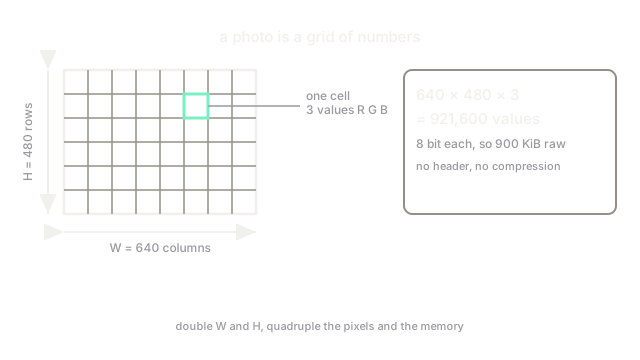
Sampling lays the grid over the scene. Anything smaller than one cell, like a distant wire against the sky, can vanish or alias into dotted patterns. Doubling and quadruples the pixel count and the memory, which is why training pipelines downscale before batching.
Quantization sets the steps
Quantization rounds each measurement to one of a fixed set of levels. With 8 bits per channel there are levels, stored as integers to . Fewer levels means visible banding in smooth skies; more levels cost memory and file size.
Worked example: what a 640 by 480 photo really is
A 640 by 480 RGB image with 8 bits per channel holds columns, rows and channels. The value count is numbers, one byte each, so the raw grid is bytes, about KiB. No header, no compression, just the grid. Formats like JPEG and PNG exist to shrink exactly this payload.
Code
width, height, channels = 640, 480, 3values = width * height * channelsprint(values, "values") # one number per cell per channelprint(round(values / 1024, 1), "KiB raw at 8 bits")# -> 921600 values# -> 900.0 KiB raw at 8 bitsWatch Out For
Sideways photos from ignored EXIF orientation
Phone cameras often store rotation as an EXIF metadata tag instead of rotating the pixels. Pillow applies it, some loaders do not, and then portrait photos decode sideways while displaying upright in the gallery. Read the orientation tag (or normalize with an EXIF-aware loader) before assuming row 0 is the top of the scene.
Channels-first versus channels-last mixups
Some libraries store images as and others as . On a square image the wrong guess raises no error: the array reshapes cleanly and the model trains on scrambled colors. Assert the shape explicitly, and check that a known red patch reads high in the channel you think is red.
The Quick Version
- A digital image is a grid of quantized light measurements, not a picture.
- Resolution fixes spatial detail; doubling width and height quadruples pixels and memory.
- Channels fix what each cell measures: one brightness value, or three color intensities.
- Bit depth fixes how many distinct values each measurement can take: 256 per channel at 8 bits.
- A 640 by 480 RGB photo is 921,600 raw values, about 900 KiB before compression.