Bit Depth
Bit depth is how many shades each pixel can name. Eight bits give 256 levels per channel, and too few levels turn smooth skies into visible stripes.
Why Does This Exist?
Pixels hold integers, and somebody must decide how many distinct integers exist. That decision is bit depth: bits per channel allow levels. It sets the file size per pixel, the smoothness of gradients, and how much editing headroom a photo carries before it falls apart.
Most images you meet are 8-bit: levels per channel, million colors in RGB. Cameras capture to bits, medical and scientific sensors more. The gap between capture depth and display depth is where banding, HDR formats and quantization bugs all live.
Think of It Like This
A staircase versus a ramp
A smooth ramp from the street to a door lets a ball roll evenly. Replace it with four giant steps and the ball thuds down in jumps, resting flat on each tread.
Bit depth is the step count. Eight bits build a staircase with treads, fine enough that eyes read it as a ramp. Two bits build four treads, and every smooth sky shows the thuds as flat stripes.
The analogy stops here: real banding also depends on the display and viewing conditions, so the same file stripes on one screen and looks smooth on another.
How It Actually Works
With bits per channel, channel values run to in steps of one. Common stops: -bit is binary , -bit is – ( levels), -bit is – ( levels), -bit is –. Total data per pixel is bits, so an 8-bit RGB pixel costs bits and a 16-bit grayscale pixel costs .
Quantizing maps a high-depth value to the nearest available level. Information dies at that step and no later processing recovers it, which is why pipelines edit in high depth and export in -bit last.
Worked example: two bits make four skies
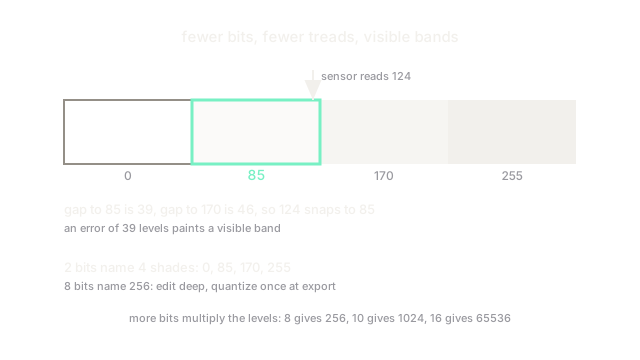
At bits the only shades are : four evenly spaced treads across the – range. A pixel measuring snaps to the nearest tread. Distances are versus , so it lands on : an error of levels, plainly visible. That rounding of neighbours onto shared treads is posterization, the striped-sky failure.
Code
levels = [0, 85, 170, 255] # every shade a 2-bit pixel can namevalue = 124 # what the sensor measurednearest = min(levels, key=lambda l: abs(l - value))print(nearest, "instead of", value)# -> 85 instead of 124Watch Out For
uint8 arithmetic wraps instead of clipping
NumPy adds uint8 arrays modulo , so brightening by yields : a black hole where a highlight belonged. Cast to a wider integer or float before any brightness math, clip to the legal range, and only then cast back to the working depth.
Quantizing before augmenting bakes in stripes
Downconverting to -bit and then stretching contrast amplifies the tread gaps into hard bands. Keep capture depth (or float) through every enhancement step and quantize exactly once at export, dithering if the gradient must stay smooth.
The Quick Version
- Bit depth gives levels per channel: 256 at 8 bits, 1024 at 10 bits, 65536 at 16 bits.
- Most photos are 8-bit per channel; sensors capture 10 to 14 bits of editing headroom.
- Too few levels posterize smooth gradients into flat visible bands.
- At 2 bits our pixel measuring 124 snaps to 85, an error of 39 levels.
- Do arithmetic in wide types and quantize once at export, never mid-pipeline.