Mobile Vision App Deployment
Mobile deployment packs detectors into phone apps with delegates, so scans run offline inside the camera session without heat.
Why Does This Exist?
A shelf scanner or ID checker cannot wait for uploads in aisles with dead signal. It must run inside the app, on the phone ISP and NPU, from a store release. Mobile deployment exists to wire that path: camera session to preprocessor to delegated runtime to overlay, with thermal and permission behavior included.
Phones differ. Android uses TFLite with NNAPI or GPU delegates. iOS uses CoreML on Neural Engine. Both start from ONNX or a trained checkpoint converted once per OS. Inference optimization picks the size and INT8 point before app work starts.
Basics first: the app owns the frame budget. A 30 fps viewfinder allows 33.3 ms per frame total. The model gets about 25 ms after capture, format, and draw take their share. Offline means the model file ships in the bundle and updates through the store, not a URL fetch at scan time.
Think of It Like This
A food cart with its own griddle
A cart that sends every order to a restaurant kitchen stalls when the street loses signal. A cart with its own griddle keeps serving from what it carries, as long as the menu fits the plate and the cook watches heat.
Phone apps are carts. The model is the menu in the bundle. Delegates are extra burners. The analogy stops at refills: carts restock daily, while app models update on store review cycles, so versioning must ride the release train.
How It Actually Works
Ship one model per OS. Convert to TFLite INT8 for Android and CoreML INT8 for iOS from the same validation split, then check accuracy per OS since delegate math differs by about a point. Keep input fixed, say 320 by 320, with letterbox padding in the app so training and phone crops match exactly.
Delegate, then verify fallback. On Android try GPU delegate first, then NNAPI, then 4 thread CPU. On iOS use Neural Engine through CoreML with CPU and GPU fallback. Log which delegate actually ran per session, because one unsupported op silently drops the whole graph to CPU and triples latency.
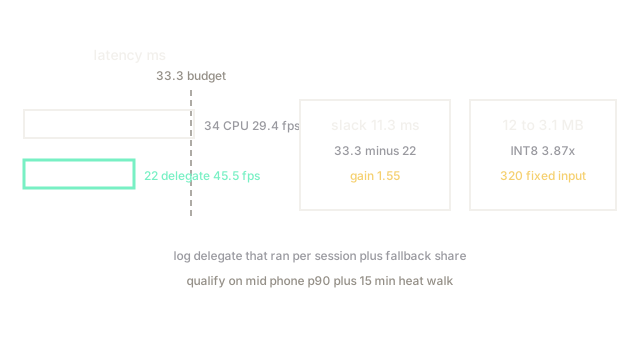
Budget thermals. A mid phone holds 34 ms CPU for minutes, then throttles toward 50 ms. Delegated 22 ms leaves 11 ms slack inside the 33.3 ms budget for capture plus draw. Pause full rate scanning after 5 minutes continuous or drop to 15 fps preview to stay cool for long shelf walks.
Worked app budget math
CPU 34 ms is 29.4 fps since 1000 divided by 34 equals 29.41, just under the 30 fps line since the budget is 33.3 ms. Delegated 22 ms is 45.5 fps since 1000 divided by 22 equals 45.45, a 1.55 times gain since 34 divided by 22 equals 1.55. Slack is 11.3 ms since 33.3 minus 22 equals 11.3. Bundle falls 12 MB to 3.1 MB INT8, 3.87 times smaller since 12 divided by 3.1 equals 3.87.
Code
The point is the store release check. It recomputes fps, gain, and slack from two latency numbers.
import numpy as np
def fps(latency_ms: float) -> float: return 1000.0 / latency_ms # viewfinder fps
def slack(budget_ms: float, latency_ms: float) -> float: return budget_ms - latency_ms # headroom for capture plus draw
print(fps(34.0)) # -> 29.41176470588235print(fps(22.0)) # -> 45.45454545454545print(34.0 / 22.0) # -> 1.5454545454545454print(slack(33.3, 22.0)) # -> 11.3Ship only if delegated p90 clears 33.3 ms on a mid phone, not a flagship. Flagships flatter CPU by 30 percent.
Watch Out For
One op that drops the delegate to CPU
A single ResizeBilinear with mismatched align corners or an unquantized Softmax forces whole graph fallback to CPU. The symptom is 22 ms in test and 68 ms in release on the same phone. Fix it by listing delegate coverage per build and by adding a startup probe that refuses release when fallback exceeds 5 percent of nodes.
Heat that passes lab and fails aisle walks
Ten minute shelf scans throttle Neural Engine clocks and push 22 ms toward 38 ms. The symptom is morning passes with afternoon misses. Fix it by testing 15 minute walks, by capping preview to 15 fps after 5 minutes, and by surfacing a cool down state instead of silently missing.
The Quick Version
- Mobile deployment ships the model in the app bundle and runs it with phone delegates offline.
- Keep 320 input fixed with matching letterbox or crops will shift accuracy by points.
- Our frame fell 34 ms to 22 ms delegated, 29.4 to 45.5 fps, 1.55 times faster.
- Slack is 11.3 ms inside the 33.3 ms budget for 30 fps viewfinder.
- Log the delegate that ran and test heat walks, or one op and hot phones will decide latency.