Image Sharpening Filters
Sharpening pulls fine detail out of an image and adds it back on top. Edges look crisper because their contrast was deliberately boosted.
Why Does This Exist?
Lenses, sensors, and compression all soften images slightly. Detection and human viewers both read stronger edges more easily, so a controlled contrast boost at boundaries pays off. Sharpening differs from edge detection: detectors output a map of boundaries, while sharpeners return the same photo with punchier transitions.
The two workhorses are unsharp masking and the Laplacian kernel. Both add extracted detail back onto the original with one strength knob, and both punish noise, so tame grain with a Gaussian first when the image is noisy.
Think of It Like This
Turning up outline ink
A comic inker traces pencil lines with a darker pen, leaving flat colours alone. Unsharp masking finds the pencil lines by subtracting the blur from the original, then inks them back on with adjustable pressure. Too much pressure and every wobble becomes a bold stroke, which is oversharpening: halos outline every edge and noise turns to grit.
How It Actually Works
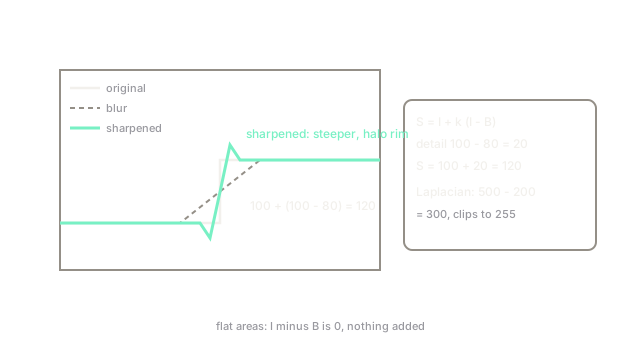
Unsharp masking builds a blurred copy, subtracts it from the original to isolate detail, and adds a scaled copy of that detail back. is the image, its blur, and the strength:
With the detail doubles. The Laplacian kernel does the same in one pass: it adds the center four times over while subtracting the four neighbours.
Worked example
A pixel reads 100 while its local blur is 80, so the detail is . With the sharpened value is . With the Laplacian kernel on a center of 100 surrounded by 50s: , clipped to 255 in practice. Big boosts need clipping, which is the first sign of overshoot.
Watch Out For
Halos and grit from oversharpening
Push too high and every edge grows a bright halo while background noise hardens into visible grit. The symptom is a crunchy image that scores worse on inspection than the soft original. Raise strength until edges read clearly, then stop; sharpen once at the end of the pipeline, never before detection.
The Quick Version
- Sharpening adds isolated detail back onto the original image.
- Unsharp masking uses original plus scaled detail with strength k.
- The Laplacian kernel sharpens in a single convolution pass.
- Detail includes noise, so denoise before sharpening noisy images.
- Overshoot shows as halos and grit; one gentle pass beats three strong ones.