Affine Transformations
An affine map applies a 2 by 3 matrix with six degrees of freedom to translate, scale, rotate and shear images while keeping parallel lines parallel.
Why Does This Exist?
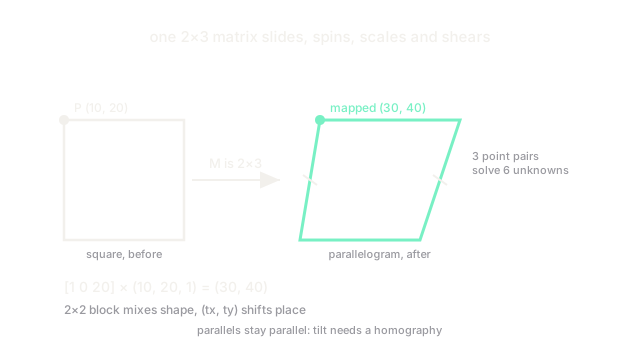
Translation, resizing, rotation and shearing look like four separate operations, but they are one: multiply coordinates by a 2 by 3 matrix. The affine form matters because three point correspondences fully determine the six unknowns, so aligning two views of a flat scene reduces to picking three matching landmarks. It is the workhorse behind face alignment, augmentation and image registration, and the natural lead-in to the perspective upgrade that handles viewpoint tilt.
If matrices-as-maps are new, the prerequisite is the gentler transformations overview, which introduces warping first. This page teaches the affine matrix itself: its structure, how three points solve it, and its hard limit.
Think of It Like This
Sliding a magnet sheet on a fridge door
Stick a photo to a fridge with a magnet sheet and slide it: up, sideways, spun, or skewed by pushing one corner. The photo never buckles out of the plane and rails on it never meet. That flat sliding, spinning and skewing is the affine family.
The analogy stops where the fridge door ends. You cannot tilt the photo away from the door so its far edge shrinks; that needs depth, which is exactly what affine maps cannot express and perspective maps add.
How It Actually Works
The 2 by 3 matrix
An affine map sends to as
The block ( through ) mixes scale, rotation and shear; translates. Appending the 1 (homogeneous coordinates) turns translation from an addition into part of the multiply, so whole chains of warps compose by matrix multiplication. Six entries mean six degrees of freedom.
Worked example, pure translation with , : the point maps to , . Every point shifts by the same , which is why translation never distorts shape.
Three points solve it
Each point correspondence gives two equations (one for , one for ), so three non-collinear pairs determine all six unknowns. That is what cv2.getAffineTransform(src3, dst3) does: hand it three matched landmarks (for example two eye corners and a nose tip) and it returns the matrix that aligns them. cv2.warpAffine then applies it with inverse mapping plus interpolation, so no holes appear in the output.
The invariant and the limit
Affine maps preserve collinearity and parallelism: straight lines stay straight, parallel lines stay parallel, and a square becomes at most a parallelogram. Ratios of areas and midpoints survive too, which is why affine alignment is safe for measurement-ish tasks. What it cannot do is converge parallels or foreshorten: photographing a poster at an angle turns its rectangle into a trapezoid, and no affine matrix fits that. Tilted planes need the 3 by 3 homography on the perspective page.
Code
import numpy as np
M = np.array([[1, 0, 20], [0, 1, 20]], dtype=float) # pure translationp = np.array([10, 20, 1], dtype=float) # homogeneous pointprint((M @ p).tolist())# -> [30.0, 40.0]Watch Out For
Collinear calibration points
If the three source points sit on one line, the six equations collapse and the solved matrix shears the image into garbage or blows up numerically. The symptom is a wildly stretched output from an innocent-looking alignment. Always check the points form a real triangle with area well above zero.
Reaching for affine on tilted planes
Fitting an affine map to a genuinely perspectival scene (a document shot at an angle) minimizes the wrong model: corners align but edges bow. The symptom is residual misalignment no parameter tweak fixes. Test parallelism first; converging lines mean you need a homography, not a bigger affine search.
The Quick Version
- One 2 by 3 matrix covers translate, scale, rotate and shear with six degrees of freedom.
- The block distorts shape; shifts position.
- Three non-collinear point pairs solve the matrix via
getAffineTransform. - Affine maps keep parallel lines parallel; squares become parallelograms at most.
- Tilted planes with converging lines need a perspective homography instead.