Image Rotation
Rotation spins an image about its center with a 2 by 3 matrix, then resamples the grid, which can clip corners and add borders.
Why Does This Exist?
Photos arrive tilted, documents scan crooked, and training sets need every orientation. Rotation turns the pixel grid by an angle about a center so content stands upright or multiplies into augmented copies. It is the most common affine operation in practice and the core of augmentation for orientation robustness.
Rotation differs from flipping in one costly way: rotated coordinates land off-grid and outside the frame, so the result must be resampled and the frame refit. This page covers the matrix, the 90-degree exact case, and the clipping trap.
Think of It Like This
Turning a rug under a fixed window frame
Imagine a patterned rug under a window frame cut in a table. Turn the rug 30 degrees: the pattern rotates, but the frame does not, so corners of the pattern slide under the table edge (clipped) and bare table shows at the sides (borders). Turning exactly 90 degrees on a square rug is special: the pattern lands perfectly back inside the frame.
The analogy stops at pixels. A rug turns continuously, but a rotated digital grid must snap every value back onto integer positions through interpolation, which softens sharp edges slightly on every non-90-degree turn.
How It Actually Works
The rotation matrix
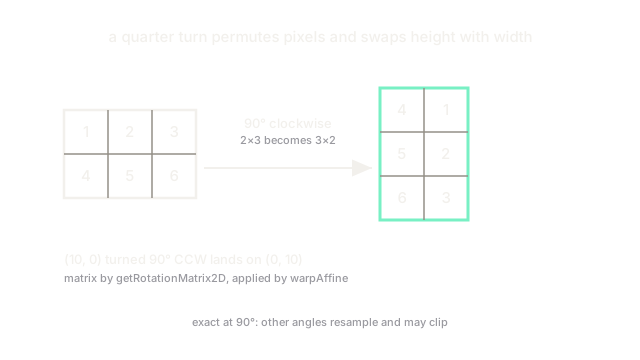
cv2.getRotationMatrix2D(center, angle, scale) builds the 2 by 3 matrix for a counter-clockwise turn of angle degrees about center, then cv2.warpAffine applies it. Mathematically, a point turns about the origin by as , . So turned 90 degrees counter-clockwise lands exactly on . OpenCV adds the center shift into the matrix's third column so the image spins in place instead of orbiting the origin.
The exact 90-degree case
Multiples of 90 degrees need no interpolation: pixels permute to new grid slots. Clockwise, a 2 by 3 block becomes the 3 by 2 block : height and width swap, values untouched. Prefer cv2.rotate with ROTATE_90_CLOCKWISE (or NumPy rot90) for these angles; it is exact and faster than a generic warp.
Clipping and borders
A 45-degree turn of a rectangular photo pushes all four corners outside the original frame. warpAffine keeps the output the same size by default, so corners are cut off and the new margins fill with black (or borderMode). To keep everything, compute the bounding box of the rotated corners and widen dsize before warping, accepting a larger output.
Code
import numpy as np
a = np.array([[1, 2, 3], [4, 5, 6]], dtype=np.uint8)print(np.rot90(a, k=-1).tolist()) # 90 degrees clockwise, exact# -> [[4, 1], [5, 2], [6, 3]]Watch Out For
Corners clipped by default
warpAffine with the original (cols, rows) size cuts off whatever rotates outside the frame. The symptom is black triangles at the edges and missing content after deskewing documents. Expand dsize to the rotated bounding box when every pixel must survive.
Angle sign and y-down coordinates
Image grows downward, so positive angles in getRotationMatrix2D turn counter-clockwise visually, opposite to the standard math convention many expect. The symptom is corrections that double the tilt instead of removing it. Test on one image with a known tilt before batching.
The Quick Version
- Rotation is an affine turn about a center, built by
getRotationMatrix2Dand applied bywarpAffine. - A 90-degree turn is an exact pixel permutation; use
cv2.rotateorrot90for it. - Non-90-degree turns resample off-grid values and soften edges slightly.
- Default output size clips rotated corners; widen
dsizeto keep them. - Positive angles go counter-clockwise in y-down image coordinates.