Cutout Augmentation
Cover one random square and keep the label. The model stops leaning on one lucky patch and starts using the whole object.
Why Does This Exist?
Classifiers cheat. Given dog photos where the head is always visible, the model learns heads and ignores bodies, tails and legs. One occluded head at test time then flips the answer, even though the rest of the dog is plain. Image classification trained without occlusion stays brittle to the most common real failure, partial cover.
Cutout fixes this in the loader with one rectangle. Erase a random square, fill it with the dataset mean, and keep the label unchanged. The network can no longer rely on one discriminative patch, because that patch is sometimes gone. The idea pairs naturally with geometric augmentation, and the broader family lives in image augmentation.
You need one idea first. Erasing inputs is regularization, like dropout, but on the image instead of the activations.
Think of It Like This
Studying with one paragraph covered
You study with a sticky note covering a random paragraph on each page. You cannot quote that paragraph in the exam, so you learn the surrounding ones well enough to answer anyway.
Cutout is that sticky note. The erased square is covered, the label is the exam question, and the model passes only by reading the rest. Where the analogy stops: the note never changes the subject, and neither does cutout.
How It Actually Works
The erase step
Pick a center uniformly, fix a size , and set the square to the per channel mean. Mean filling keeps the input statistics near zero after normalization, while zero filling on an already normalized image injects a strong signal. Apply with probability , often , so half the images stay clean.
A worked area ratio
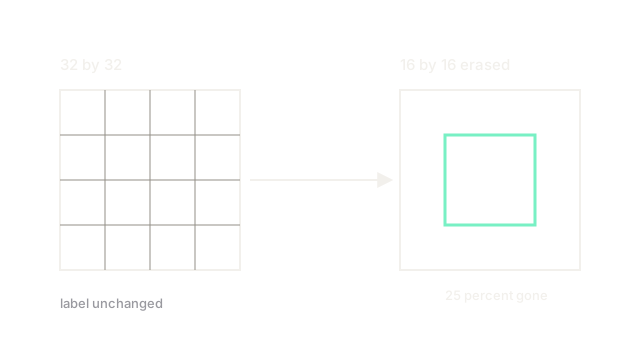
Image pixels. Hole pixels:
One quarter gone, label unchanged. On photos a hole covers about percent, which is why larger images use larger holes. Erasing more than about one third regularly deletes small objects entirely.
Fill and schedule
Fill with the dataset mean, not black, unless the pipeline documents black. Keep fixed per run, and do not stack several holes unless the task is built for heavy occlusion. Detection needs extra care: if the hole swallows the whole box, drop or down weight that instance.
Code
import numpy as np
def cutout(img: np.ndarray, size: int = 16, fill: float = 0.0) -> np.ndarray: """Erase one random square. img is H by W by C in float.""" out = img.copy() h, w, _ = out.shape cy = int(np.random.randint(0, h)) cx = int(np.random.randint(0, w)) y1, y2 = max(0, cy - size // 2), min(h, cy + size // 2) x1, x2 = max(0, cx - size // 2), min(w, cx + size // 2) out[y1:y2, x1:x2, :] = fill # label unchanged by contract return out
img = np.ones((32, 32, 3), dtype=float)print(cutout(img, 16).shape) # -> (32, 32, 3)Watch Out For
Erasing the whole small object
On a photo a hole can swallow a distant bird whole, leaving background tagged as bird. The symptom is rising loss on small object classes after cutout helps large ones. Cap hole area near percent and skip instances whose boxes end up mostly covered.
Filling with the wrong constant
Black fill on a mean subtracted pipeline is not neutral, it is a dark square signal the model can key on. The symptom is erased squares detected as features in feature maps. Fill with the channel mean used in normalization.
The Quick Version
- Cutout erases one random square and keeps the label to break reliance on one patch.
- A 16 by 16 hole in a 32 by 32 image removes 25 percent of the area.
- Fill with the dataset mean and cap holes near one quarter of the image.
- Drop or down weight detection boxes that end up mostly erased.