Adaptive Thresholding
Adaptive thresholding computes a cutoff per pixel from its local neighborhood mean or Gaussian sum minus a constant, handling uneven light and shadows.
Why Does This Exist?
Global cutoffs die the moment a shadow crosses the frame: one number cannot serve bright and dark halves. Adaptive thresholding gives every pixel its own cutoff computed from its neighborhood, so slow lighting gradients cancel out and only local contrast decides. It is the standard answer for scanned documents with vignetting, microscopy with uneven fields, and outdoor scenes under clouds, completing the trio under thresholding alongside global and Otsu.
This page covers the two weighting methods, a hand-computed 3 by 3 window, and the two parameters that control everything.
Think of It Like This
Grading on a curve per classroom
Instead of one national pass mark, each classroom sets its bar from its own average minus a margin. A dim classroom with dim bulbs still passes its brightest students, because the bar adapts to local conditions. The constant is the strictness margin the examiners subtract everywhere.
The analogy stops at window size. Classrooms are given, but neighborhoods are chosen: too small a window and the "class" is one desk, so the curve eats real distinctions; too large and the dim and bright rooms merge back into one unfair national mark.
How It Actually Works
The per-pixel rule
For pixel , let be a weighted summary of its blockSize by blockSize neighborhood. The cutoff is , and the pixel is foreground when it exceeds its own . OpenCV offers two summaries in cv2.adaptiveThreshold: ADAPTIVE_THRESH_MEAN_C (plain neighborhood average) and ADAPTIVE_THRESH_GAUSSIAN_C (Gaussian-weighted, favoring close pixels, better on noisy gradients). Computation uses integral images, so window size barely affects speed.
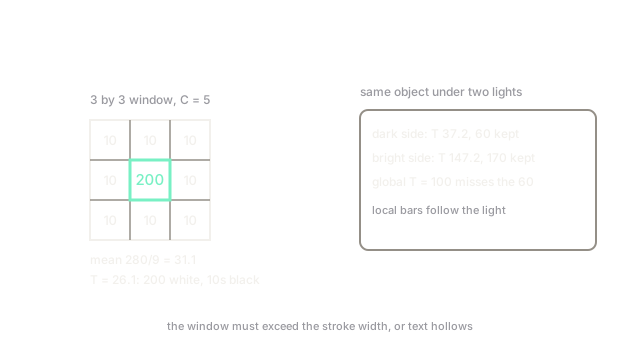
Worked window with on the 3 by 3 patch : the mean is . The center's cutoff is , and makes it foreground. A background pixel of 10 in the same window gets the same and stays background: the spike separates from its surroundings regardless of absolute level.
The two knobs
blockSize must be odd and larger than the features you want to keep: a window smaller than a character's stroke turns stroke interiors into background (hollow text). Start near 21 to 51 for documents. is a fine-tuning margin, typically 2 to 10: larger demands stronger local contrast, killing noise speckles but erasing faint pencil. Tune first, blockSize second.
The price of locality
Adaptive methods amplify flat-region noise: where the window holds only grain, the cutoff hugs the grain and speckles flip to foreground. Gaussian weighting plus light pre-blur calms this. They also erase large uniform objects: inside a big dark region every window looks uniform, so interiors classify as background and only borders survive. For big blobs under even light, global or Otsu wins.
Code
import numpy as np
patch = np.array([[10, 10, 10], [10, 200, 10], [10, 10, 10]])C = 5T = patch.mean() - C # ADAPTIVE_THRESH_MEAN_C on this windowprint(round(T, 2), 200 > T)# -> 26.11 TrueWatch Out For
Hollow interiors from tiny windows
A blockSize smaller than the stroke width makes window statistics follow the stroke itself, so character centers fall below their own cutoff. The symptom is outline-only text in the mask. Size the window to comfortably contain foreground features plus background margin.
Speckle storms in flat regions
Uniform areas have no real contrast, so the adaptive cutoff slices noise into salt-and-pepper foreground. The symptom is dirty backgrounds that global thresholding left clean. Raise , pre-blur, and follow with a morphological opening to sweep the survivors.
The Quick Version
- Each pixel's cutoff is from its own neighborhood, canceling slow gradients.
- Mean weighting is fast; Gaussian weighting handles noisy gradients better.
- Example: center 200 in a 10-valued 3 by 3 window passes with .
blockSizemust be odd and larger than foreground features; usually sits at 2 to 10.- Weak on flat-region noise and big uniform objects; pre-blur and clean up after.