Image Thresholding
Thresholding turns a grayscale image into a binary mask by comparing each pixel to a cutoff, the simplest segmentation step before counting and contours.
Why Does This Exist?
Counting cells, reading gauges and finding parts on a belt share one need: decide, per pixel, object or background. Thresholding is the cheapest possible decider: compare each intensity to a cutoff and paint the pixel white or black. It runs in a single pass, needs no training data, and feeds directly into contour finding and connected components. The broader classical toolbox (edges, regions, watershed) is surveyed on the segmentation page; this page is the thresholding map.
Three cutoff strategies each own a page: global for one cutoff under even light, adaptive for per-pixel cutoffs under uneven light, and Otsu for the automatic histogram-optimal cutoff. This page covers the shared rule, the five OpenCV types, and preprocessing.
Think of It Like This
A height bar at an amusement ride
A ride sign reads "you must be this tall": every child is measured against one bar and sorted into riders and waiters. Nobody judges faces or clothes, only height against the bar. Thresholding measures pixels against a brightness bar the same way.
The analogy stops at fairness. The bar cannot see that a tall child stands in a ditch (shadow) or a short one on tiptoes (glare). One global bar misjudges anyone standing on uneven ground, which is why lighting decides everything.
How It Actually Works
The binary rule and its variants
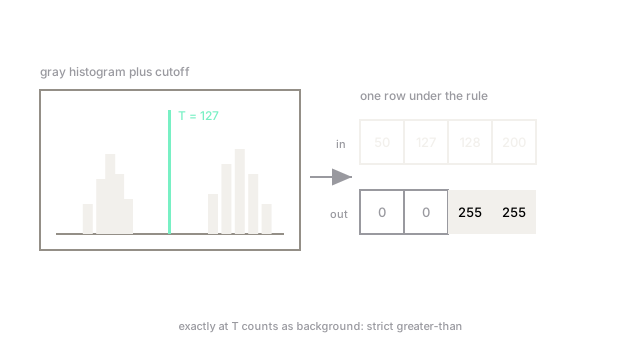
retval, mask = cv2.threshold(gray, T, 255, cv2.THRESH_BINARY) implements: pixel becomes 255 (foreground) if its value is greater than , else 0. Note the strict inequality: a pixel exactly at goes to background. With , the row becomes : 127 stays black, 128 flips white. The four siblings are THRESH_BINARY_INV (swap black and white), THRESH_TRUNC (cap aboves at instead of painting white), THRESH_TOZERO (zero below- pixels, keep the rest as-is) and THRESH_TOZERO_INV.
Grayscale first, always
Thresholding reads one intensity per pixel. On color input OpenCV would need a single channel anyway, so convert deliberately with cv2.cvtColor(img, cv2.COLOR_BGR2GRAY) rather than letting a pipeline guess. When color is the actual signal (red defect on gray metal), threshold a color distance or a single channel like HSV saturation instead of gray.
Denoise before deciding
A speck of noise above becomes a false foreground pixel, and thresholding has no neighborhood to overrule it. Blur lightly (Gaussian or ) before cutting: it suppresses single-pixel spikes while moving real boundaries by less than a pixel. Morphological cleanup after the cut then removes the survivors.
Code
import numpy as np
row = np.array([50, 127, 128, 200])mask = np.where(row > 127, 255, 0) # cv2.THRESH_BINARY, T=127print(mask.tolist())# -> [0, 0, 255, 255]Watch Out For
Thresholding color images directly
Feeding BGR into a threshold call either errors or thresholds an arbitrary channel, and brightness-based cuts ignore hue entirely. The symptom is masks that follow illumination instead of objects. Convert to grayscale or the meaningful channel first, every time.
The boundary pixel at exactly T
THRESH_BINARY uses strict greater-than, so edge pixels sitting exactly on the cutoff fall to background. The symptom is one-pixel contour wobble when sweeps across flat regions. Harmless once known, baffling in A/B comparisons of nearby thresholds.
The Quick Version
- Thresholding paints pixels above white and the rest black in one pass.
- Five OpenCV types: binary, inverted, truncate, to-zero and inverted to-zero.
- The comparison is strict: pixels exactly at count as background.
- Always convert to grayscale (or the signal channel) before cutting.
- Blur lightly first; clean survivors with morphology after.