Basic Image Operations
Pixelwise arithmetic and masking combine images of equal size, with saturation at 255, the basis for blending, masking and brightness shifts.
Why Does This Exist?
Every fancier vision step sits on top of pixelwise arithmetic. Before you blur, warp or segment an image, you often need to brighten it, subtract a background frame, or keep only the pixels inside a mask. These are pointwise operations: each output pixel depends only on the input pixels at the same position.
If you are new to images as arrays, start here. An 8-bit grayscale image is a grid of integers from 0 (black) to 255 (white); a color image is three such grids stacked. The companion page on geometric warps moves pixels to new positions, while this page changes pixel values in place. This page covers addition, subtraction, blending and masking, and where each breaks.
Think of It Like This
Two transparent sheets on a light table
Lay two transparencies on top of each other on a light table. Where both are dark, the stack stays dark; where either lets light through, the stack brightens. Stacking is addition. Now slide a stencil with a hole cut in it over the stack: only the region under the hole shows through. That stencil is a mask.
The analogy stops at saturation. Real light keeps adding up, but an 8-bit pixel stops at 255. Stack two transparencies that each pass "200 units" of light and the pixel reads 255, not 400.
How It Actually Works
Addition and subtraction with saturation
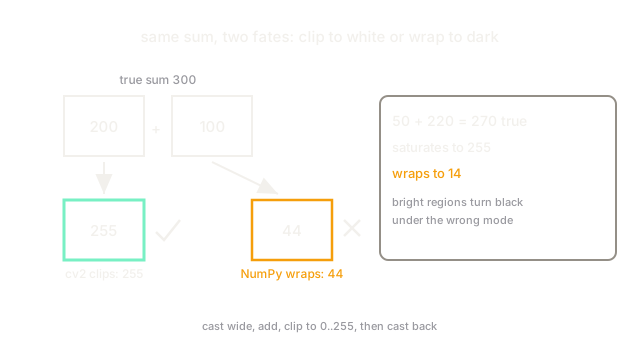
For two same-size images and , the sum image is per pixel. OpenCV's cv2.add saturates: anything above 255 clips to 255, anything below 0 clips to 0. Plain NumPy addition on uint8 arrays instead wraps modulo 256, so becomes 44. That wrap is almost never what you want.
Worked example on one pixel pair: , . True sum 300. cv2.add gives 255 (white, clipped). NumPy uint8 gives (dark gray, wrapped). A second pair, : saturated 255, wrapped . One wrong addition mode turns bright regions black.
Weighted blending
Blending generalizes addition: , with weights and that usually sum to 1. Setting , overlays onto at 30 percent strength, the classic cross-dissolve. OpenCV's cv2.addWeighted computes this in one call with saturation built in.
Bitwise masking
Bitwise AND, OR, NOT and XOR act on the bits of each pixel and are the standard way to apply a binary mask: result = cv2.bitwise_and(image, image, mask=mask) keeps pixels where the mask is 255 and zeroes the rest. This is how you restrict later steps, like contour finding, to a region of interest.
Code
import numpy as np
a = np.array([[200, 50]], dtype=np.uint8)b = np.array([[100, 220]], dtype=np.uint8)
wrapped = a + b # uint8 wraps modulo 256print(wrapped.tolist())# -> [[44, 14]]
safe = np.clip(a.astype(int) + b.astype(int), 0, 255).astype(np.uint8)print(safe.tolist())# -> [[255, 255]]Watch Out For
Silent wraparound in NumPy uint8 math
Adding two uint8 arrays with + wraps past 255 back to 0 with no warning, so brightened regions come out black. The symptom is dark blotches where you expected white. Cast to a wider type, add, clip to , and cast back, or use cv2.add, which saturates.
Mismatched sizes and channel counts
Pixelwise ops need identical height, width and channel count. Adding a color image to a grayscale one, or frames from two cameras at different resolutions, raises an error or broadcasts into garbage. Check .shape on both inputs first and convert with cv2.cvtColor or resize before combining.
The Quick Version
- Basic image operations change pixel values in place: add, subtract, blend and mask.
- OpenCV arithmetic saturates at 0 and 255; raw NumPy
uint8math wraps modulo 256. - Blending follows , usually with weights that sum to 1.
- Bitwise AND with a mask keeps only the region of interest for later steps.
- Both inputs must match in size and channel count before any pixelwise op.