Reading and Writing Images in OpenCV
OpenCV loads images as BGR arrays with imread flags, saves them with imwrite, and shows windows with imshow plus waitKey in every vision pipeline.
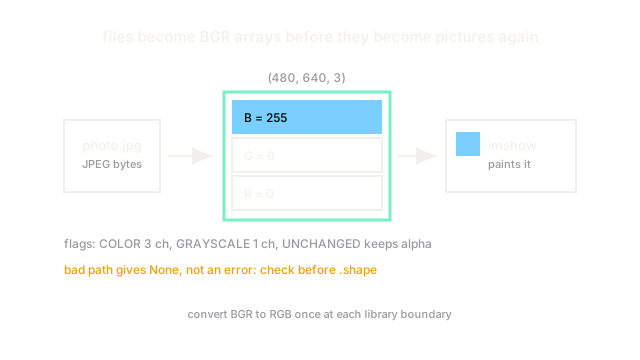
Why Does This Exist?
No vision program works on filenames; it works on arrays. Something has to decode a JPEG or PNG file into numbers, and something has to turn numbers back into a viewable picture. In OpenCV that bridge is three calls: imread for loading, imwrite for saving, and imshow plus waitKey for display. Every pipeline in this section starts with one of them, so a silent mistake here poisons everything downstream.
If pixels-as-numbers are new to you, the key fact is the array layout: a color image loads as a height-by-width-by-3 array of 8-bit values, and OpenCV orders those three channels Blue, Green, Red. For what those channels mean, see color spaces. This page covers the flags that control loading, the display loop, and the traps.
Think of It Like This
A loading dock with labeled crates
Think of an image file as a sealed shipping crate and imread as the dock crew. The crew opens the crate and stacks the contents as rows of numbered boxes (the array). The flags argument is your instruction slip: "unpack all three color layers" (IMREAD_COLOR), "just give me the grayscale layer" (IMREAD_GRAYSCALE), or "leave everything exactly as packed, alpha channel included" (IMREAD_UNCHANGED). Pick the wrong slip and the crew throws away a layer you needed.
The analogy stops at color order. A real dock keeps crates in the order received, but OpenCV always stacks Blue first, even though screens and most other libraries expect Red first.
How It Actually Works
Reading: imread and its flags
img = cv2.imread("photo.jpg", cv2.IMREAD_COLOR) decodes the file into a NumPy array of shape with dtype uint8. The flag decides the output: IMREAD_COLOR (the default, value 1) always returns 3 channels, IMREAD_GRAYSCALE (0) returns a single channel, and IMREAD_UNCHANGED (-1) preserves alpha transparency. A 640 by 480 color photo therefore arrives as shape : rows first, then columns.
When the path is wrong or the file is corrupt, imread returns None instead of raising. Always check if img is None before touching .shape, or the failure surfaces ten lines later as a confusing AttributeError.
The BGR trap
Channel 0 is Blue. Setting img[:, :, 0] = 255 paints the image blue, not red. Matplotlib's imshow, by contrast, expects RGB, so showing an OpenCV array directly swaps red and blue faces. Convert once with cv2.cvtColor(img, cv2.COLOR_BGR2RGB) at the boundary between libraries and never convert twice.
Writing and displaying
cv2.imwrite("out.png", img) encodes the array back to a file; the extension picks the format, and PNG is lossless while JPEG quality defaults to 95. Display needs two calls: cv2.imshow("window", img) schedules the picture, and key = cv2.waitKey(0) actually paints it and waits that many milliseconds for a keypress (0 means forever). Without waitKey the window freezes blank. Close with cv2.destroyAllWindows().
Code
import numpy as np
img = np.zeros((480, 640, 3), dtype=np.uint8)img[:, :, 0] = 255 # OpenCV channel 0 is Blue, not Redprint(img.shape)# -> (480, 640, 3)print(img[0, 0].tolist())# -> [255, 0, 0]Watch Out For
imread returns None on a bad path
A misspelled filename or an unsupported format gives None, not an exception, and the crash lands later on an unrelated line. The symptom is AttributeError: 'NoneType' object has no attribute 'shape'. Guard every load with an explicit None check that prints the path.
Red-blue swap across libraries
OpenCV speaks BGR while Matplotlib, the web and most textbooks speak RGB. The symptom is a normal-looking image with blue skin and orange skies. Convert exactly once at each library boundary and name converted variables (for example rgb) so the order is visible.
The Quick Version
imreaddecodes files into arrays; its flag picks color, grayscale or unchanged with alpha.- A color image is a
uint8array in Blue-Green-Red order. imreadreturnsNoneon failure, so check before use.imwritesaves by file extension;imshowneedswaitKeyto actually paint.- Convert BGR to RGB exactly once when handing arrays to other libraries.