CutMix Augmentation
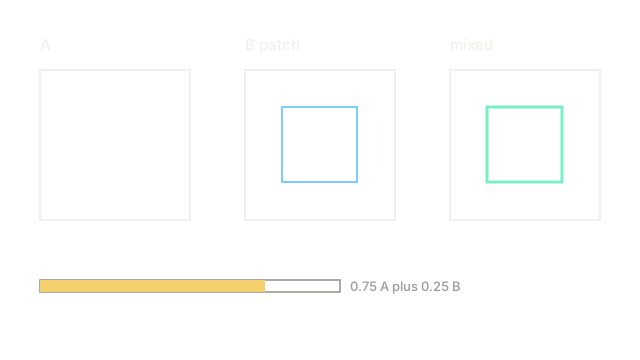
Paste a square from photo B into photo A and mix the labels by area. The model sees real pixels from both scenes with an honest mixed tag.
Why Does This Exist?
Mixup blends every pixel, so no region stays real. Localization suffers because the model never sees a clean edge from either scene, only ghosts. Detection and classification both want mixed supervision without giving up real pixels.
CutMix keeps both. It cuts a rectangle from image , pastes it into image , and sets the label from the kept area. The result shows true pixels outside the patch and true pixels inside, with a label that says exactly how much of each is visible. The family overview is image augmentation, and the erase only cousin is cutout.
You need one idea first. Area is the label. The pasted fraction sets the mixed tag, not a sampled weight.
Think of It Like This
A collage with the receipt attached
You glue a magazine square onto a newspaper page and attach a receipt saying 75 percent newspaper and 25 percent magazine. Nobody claims the collage is one pure source.
CutMix is that collage. The binary mask is the glue edge, and the area ratio is the receipt. Where the analogy stops: the model must learn from the collage as if both sources stay present, not as a new single scene.
How It Actually Works
Mask and label rule
Sample a binary mask with a random rectangle set to inside and outside. Then:
Here is the kept area fraction of , so . Unlike mixup, comes from geometry, not from a Beta draw.
A worked area label
Image . Patch :
Label and become . Pixels outside the patch are pure , pixels inside are pure , and the tag matches the visible split.
Patch sampling
Patch width and height come from sampling uniformly, then sizing the box to that area with matching aspect jitter. Clip the patch to the frame. For detection, boxes under the patch need reweighting or dropping when mostly covered.
Code
import numpy as np
def cutmix_label(patch: int, image: int) -> float: """Kept fraction of A after pasting a square patch. Returns lambda.""" return 1.0 - (patch * patch) / float(image * image)
print(cutmix_label(16, 32)) # -> 0.75Watch Out For
Pasting over the only small object
A patch can fully bury a tiny bird while the label still claims bird. The model learns background as bird. The symptom is falling small object recall after CutMix helps large ones. Shrink patches on small object datasets or drop covered instances.
Treating CutMix like dropout at test time
CutMix collages never appear at deployment, so heavy use shifts the train distribution. The symptom is great train mixing accuracy with flat validation. Keep CutMix probability near and always validate on clean images.
The Quick Version
- CutMix pastes a real patch from one photo into another and labels by kept area.
- A 16 by 16 patch in a 32 by 32 image gives label 0.75 and 0.25.
- Lambda comes from patch geometry, not from a random Beta draw.
- Shrink patches or drop covered boxes when small objects can vanish underneath.