Image Interpolation for Resizing
Image interpolation estimates off-grid pixels when resizing or warping, choosing nearest, linear, cubic, area or Lanczos sampling by direction and budget.
Why Does This Exist?
Resizing and warping ask for pixel values at fractional coordinates like , but sensors only record whole positions. Interpolation is the rule that fills those gaps from neighbors. The choice visibly changes results: one flag keeps text crisp, another invents halos, a third aliases textures into moire. The general blending math is covered on the math interpolation page; this page is the image-specific guide: which OpenCV flag, in which direction, and what each costs.
Think of It Like This
Guessing the color between fence pickets
Stand before a picket fence painted in a gradient and point at a gap between two pickets: your guess blends the neighbors, weighted toward the closer one. That is linear interpolation. Now step back and average whole stretches of fence per step: that is area sampling. Ask the two nearest pickets only and you get steps (nearest); consult a longer run and fit a smooth curve and you get the silky but occasionally overshooting cubic guess.
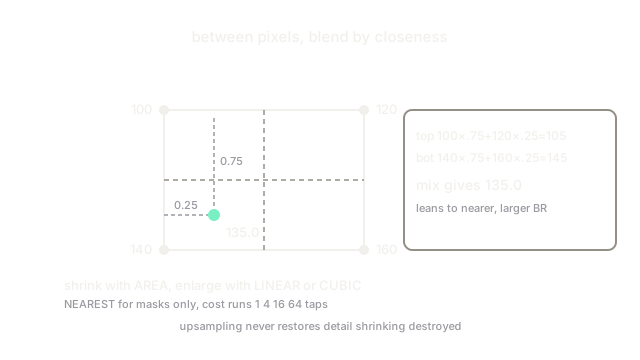
The analogy stops at invented detail. No guessing rule recovers a picket you never saw. Upsampling spreads existing information smoothly; it never restores the high frequencies shrinking destroyed.
How It Actually Works
The five flags
For a target at fractional , with neighbors at integer offsets:
- INTER_NEAREST copies the closest pixel. Zero blending, blocky edges, but the only choice for label masks, where averaging would invent fractional classes.
- INTER_LINEAR blends the 4 surrounding pixels by distance. The default: fast and fine for enlarging.
- INTER_CUBIC fits a cubic surface through 16 neighbors. Sharper enlargements, roughly 4 times the arithmetic of linear, with occasional overshoot past real minima and maxima (halos at hard edges).
- INTER_AREA averages each output pixel's footprint in the input. The correct shrinker: it low-passes instead of skipping rows.
- INTER_LANCZOS4 uses a windowed sinc over 64 neighbors. Best quality for photographic enlarging, slowest, and can ring near strong edges.
Worked bilinear example
Take a 2 by 2 patch with corners and sample at , measured right and down from the top-left. Blend the top row: . Blend the bottom row: . Blend the two rows vertically: . The estimate leans toward the closer, larger bottom-right values, as it should.
The direction rule and its cost
Shrinking discards information, so average it (INTER_AREA); enlarging spreads information, so blend it (INTER_LINEAR or INTER_CUBIC). Cost tracks neighborhood size: nearest 1 pixel, linear 4, cubic 16, Lanczos 64 taps per output pixel per channel. On a 4K frame that factor decides real time versus slideshow, which is why production shrink pipelines hardcode INTER_AREA and enlarge pipelines default to linear unless quality audits demand cubic.
Code
def bilinear(x, y, tl, tr, bl, br): top = tl * (1 - x) + tr * x bottom = bl * (1 - x) + br * x return top * (1 - y) + bottom * y
print(bilinear(0.25, 0.75, 100.0, 120.0, 140.0, 160.0))# -> 135.0Watch Out For
Linear downscaling moire
Shrinking past about half with INTER_LINEAR samples a subset of rows, so striped textures alias into wavy interference. The symptom is shimmer in thumbnails of fabrics, screens and fences. Always branch on direction: area for shrinking, linear or cubic for enlarging.
Cubic overshoot on hard edges
INTER_CUBIC can return values outside the neighbors' range, drawing bright or dark halos along text and line art. The symptom is ghost outlines after upscaling documents. Prefer linear for graphics with flat fills, and reserve cubic for continuous-tone photos.
The Quick Version
- Interpolation estimates values at fractional coordinates from integer neighbors.
- Nearest for labels, area for shrinking, linear or cubic for enlarging, Lanczos for top quality.
- Bilinear blends 4 pixels by distance; bicubic fits 16 with sharper but halo-prone results.
- Cost scales with neighborhood size, from 1 tap to 64 per pixel.
- No method restores detail that shrinking already discarded.