NumPy Arrays for Images
NumPy turns a photo into a grid of numbers you can add, scale and slice all at once, with shapes that say exactly what each axis means.
Why Does This Exist?
Python loops visit pixels one at a time, and photos hold millions of them. NumPy exists to say the operation once and have compiled C code apply it to the whole grid. One division normalizes every pixel. One slice crops any rectangle. The script stays short while the speed matches hand-written C.
That bargain rests on a contract: every array has a shape, a data type, and contiguous memory behind it. The shape says height rows, width columns, three channels. The dtype, usually uint8 for loaded photos, fixes the range 0 to 255 and the wraparound arithmetic. This page covers that contract and the two operations vision uses most: scaling and slicing. Displaying the result belongs to Matplotlib; what each depth can hold belongs to bit depth.
Think of It Like This
A spreadsheet that recalculates every cell at once
A photo in Python lists is a stack of paper slips, one per pixel, and changing them means visiting each slip. A NumPy array is the same numbers moved into a spreadsheet: one formula in the top cell fills the whole column in a blink, because the sheet, not you, does the visiting.
Shape is the column headings. Dtype is the cell format, and formatting a money column as text breaks every sum the way uint8 breaks every negative. The analogy stops at the grid: a spreadsheet shows you the cells, while an array of a million pixels is read through its shape, its dtype, and spot checks, never by eye.
How It Actually Works
An array is a shape plus a flat block of memory plus a rule for walking it. np.zeros((224, 224, 3), dtype=np.uint8) reserves bytes and reads element at a computed offset. No per-element objects, no pointers per row. That density is the speed.
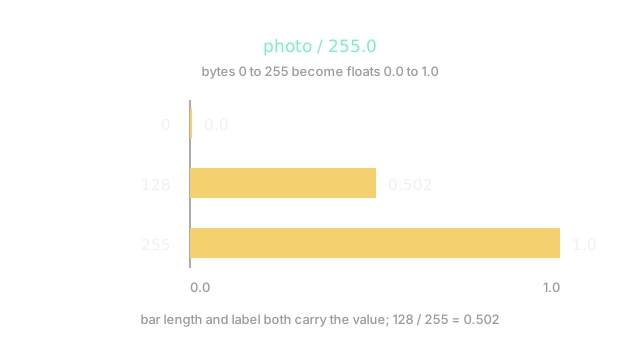
Vectorization applies one operation to the block. Dividing a uint8 photo by 255 needs a float conversion first, because integer division would truncate everything to 0 or 1:
- 0 becomes .
- 128 becomes .
- 255 becomes .
The diagram draws exactly those three bars. Models expect this 0 to 1 float range, which is why normalization is the first line of every pipeline rather than a nicety.
Broadcasting and slicing
Broadcasting stretches small shapes across big ones without copying. Subtracting a per-channel mean of shape from a photo of shape aligns from the right and applies each mean down its whole plane. Slicing cuts rectangles as views: photo[40:120, 60:200] is rows 40 to 119 and columns 60 to 199, sharing memory with the original, so writing through the slice edits the photo. The vector and matrix page covers the shape-alignment rules behind both.
Code
Normalization and a slice, with the numbers checked:
import numpy as np
px = np.array([0, 128, 255], dtype=np.uint8)f = px.astype(np.float64) / 255.0 # convert first: integer math would truncateprint(f) # -> [0. 0.50196078 1. ]print(round(float(f[1]), 3)) # -> 0.502
crop = np.zeros((224, 224, 3), dtype=np.uint8)print(crop[40:120, 60:200].shape) # -> (80, 160, 3)The 0.502 matches the hand division, and the crop is 80 rows by 160 columns with all three channels. Note the float conversion before the division: integer math would truncate everything toward 0 or 1, so convert explicitly.
Watch Out For
Byte arithmetic that wraps instead of clipping
uint8 addition wraps modulo 256, so brightening 200 by 100 gives 44, a black hole where a highlight belonged. The symptom is dark speckles across bright regions after any arithmetic on loaded photos, with no error and no warning.
Fix it by converting to a wider type before the math and clipping after: compute in float or int16, clip to 0 and 255, then cast back. Treat every uint8 plus sign as guilty until proven innocent.
Editing through a slice that shares memory
A slice is a view, not a copy, so normalizing crop in place also normalizes that rectangle inside photo. The symptom is a full image that changes when you only meant to touch the crop, discovered much later in a saved file.
Fix it by calling .copy() when the slice must live on its own. Cheap insurance next to a debugging session: views are the default because copies of megapixel blocks cost real memory.
The Quick Version
- NumPy stores a photo as one shaped memory block, so one operation covers millions of pixels in compiled code.
- Shape plus dtype
uint8is the contract: dimensions, range 0 to 255, wraparound math. - Normalization divides by 255 after converting to float: 128 becomes 0.502, the range models expect.
- Broadcasting aligns small shapes from the right, applying per-channel values down whole planes.
- Slices are views that share memory; copy when the crop must stand alone.
- Byte math wraps modulo 256, so widen the type before adding and clip before casting back.