Python for Computer Vision
Python is the shared plug every vision library speaks through: your ten lines of script direct fast compiled code that moves millions of pixels.
Why Does This Exist?
No vision program works on filenames. It works on arrays of pixels, and something has to carry those arrays between the file on disk, the fast compiled routine that transforms them, and the screen. Python is that carrier. Nearly every vision library (OpenCV, NumPy, PyTorch) exposes its real work, written in C++ or CUDA, through a Python call you can read in one glance.
That split is the whole reason Python won vision. You write ten lines that say what should happen, and compiled code does the millions of operations. This page covers Python's job in that split: scripts, environments, and the pixel loop that explains why the libraries exist. Number grids themselves belong to NumPy; loading files belongs to reading and writing images.
Think of It Like This
One plug every appliance shares
A kitchen has a dozen appliances from different makers, and every one plugs into the same wall socket. You never open the blender to rewire it. You plug it in, press a button, and its motor, built by specialists, does the violent fast work while you only decide when it runs.
Python is the socket. OpenCV, NumPy, and PyTorch are the appliances, with their motors written in C++ and CUDA. Your script is the hand on the buttons. The analogy stops at the bill: wall power is instant, while each socket call copies data across a boundary, so millions of tiny calls cost more than a few big ones. That cost is why pixel loops move into NumPy.
How It Actually Works
A vision script does three things in order. It loads arrays from files, it calls library functions that transform those arrays, and it saves or shows the result. Python itself rarely touches individual pixels. It holds the plan: which file, which operations, in which order, with which settings.
Environments keep that plan reproducible. A virtual environment pins an exact set of library versions for one project, so the OpenCV that reads your pixels today is the same one that reads them next year. Installing everything into the one system Python instead lets projects fight over versions, and the loser fails at import time.
The pixel loop, and why it moves
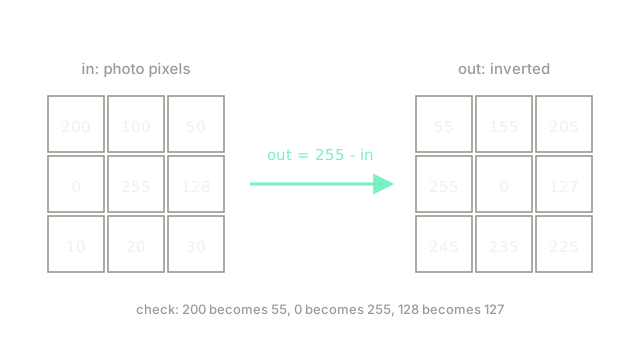
Inverting a photo means replacing every pixel with . Written as a loop over a 3 by 3 grid:
- 200 becomes 55, 100 becomes 155, 50 becomes 205.
- 0 becomes 255, 255 becomes 0, 128 becomes 127.
- 10 becomes 245, 20 becomes 235, 30 becomes 225.
Nine pixels, nine subtractions, and the diagram above shows every one. Now scale that honesty up. A 224 by 224 photo holds 50,176 pixels, and a Python loop visits them one at a time with interpreter overhead on each. The same operation as one library call processes the whole grid in compiled code, hundreds of times faster. So the loop teaches the operation, and then the operation moves into basic image operations where it runs at full speed.
Code
Plain Python first, so the operation is unmistakable. No library, just nested lists:
photo = [[200, 100, 50], [0, 255, 128], [10, 20, 30]]
out = [[255 - v for v in row] for row in photo]
print(out[0]) # -> [55, 155, 205]print(out[1][0], out[2][2]) # -> 255 225Every number matches the hand calculation and the diagram. Corners behave sensibly: 0 becomes 255 and 255 becomes 0, so inverting twice returns the original grid.
Watch Out For
Installing every project into the same Python
pip install into the system Python feels quick, and it works right up until the second project needs a different OpenCV. Then one of them imports the wrong build and fails with an error about missing symbols, in code you never touched.
The symptom is an import error that appears when you switch folders, not when you install. Fix it at the start of each project: one virtual environment per project, versions pinned in a requirements file, and installs only inside it. Reproducing someone's result begins with reproducing their environment.
Looping over pixels in Python on real photos
The 3 by 3 loop above runs instantly and teaches the idea. The same loop over a 12-megapixel photo runs 12 million interpreter steps, and a video turns that into billions. The symptom is a script that works on thumbnails and never finishes on real frames, with the CPU hot and one core busy.
Fix it by expressing the operation on the whole array at once, which is the subject of NumPy. Write the loop to learn, then delete it to ship.
The Quick Version
- Python carries pixel arrays between fast compiled libraries; it plans the work more than it performs it.
- A pixel inverts as 255 minus its value: 200 becomes 55, 0 becomes 255, 128 becomes 127.
- One virtual environment per project keeps library versions from fighting across folders.
- Per-pixel Python loops teach correctly and run slowly, so real operations move into array calls.
- Twice inverted returns the original, which makes inversion a handy round-trip check.