OpenCV Image Processing
OpenCV is the workbench for pixels: it loads photos as number grids, resizes and recolors them, and reads video frame by frame, with a byte order that surprises everyone once.
Why Does This Exist?
Photos arrive as compressed files and video arrives as a stream, while models want plain arrays. OpenCV is the bridge both directions: imread decodes files into grids, imwrite encodes grids back, resize and cvtColor reshape and recolor them, and VideoCapture hands video over one frame at a time. It does all of this in compiled code, in place where possible, which is why it sits at the front of most pipelines.
Its age shows in one famous default. imread stores channels blue first, while almost everything downstream expects red first. That single mismatch has silently ruined more first demos than any other line in vision. This page covers loading, converting, resizing, and frame reading, including the byte order. File formats and display windows belong to reading and writing images; color meanings belong to color spaces.
Think of It Like This
A photo lab with the trays in odd order
A darkroom has three chemical trays, and this particular lab arranged them blue, green, red instead of red, green, blue. Every regular develops perfect prints because they learned the order on day one and convert without thinking. Every newcomer dips red first, gets a blue print, and blames the chemicals.
OpenCV is that lab. The trays are the channel positions, the prints are your arrays, and the fix is a habit, not a setting: convert on entry or remember the order at every step. The analogy stops at the stakes: a blue print wastes paper, while a blue-first array fed to a trained model fails silently at full speed.
How It Actually Works
imread decodes a file into a uint8 array of shape with channels in B, G, R order. From there the verbs compose. cvtColor with the BGR-to-RGB code permutes the last axis into the order everyone else expects. resize resamples to a target width and height, trading detail for speed with an interpolation choice. VideoCapture opens a file or camera and returns one frame plus a success flag per read call, ending with failure rather than an exception when the stream runs out.
The one-pixel swap
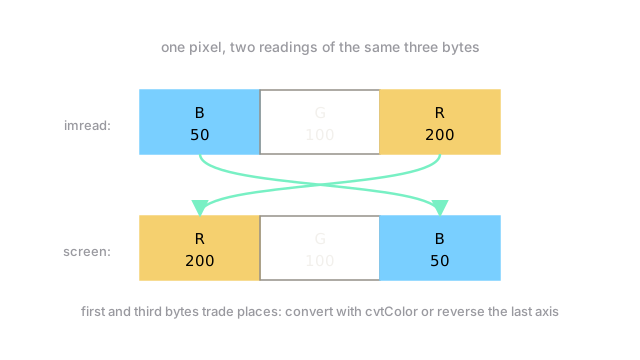
Take a single rust-orange pixel whose true channels are , , . imread stores the bytes , blue first, exactly as the diagram shows. Reading those bytes as red first reports , , . The outer two channels trade places while green stands still, and the pixel renders ocean blue. Reversing the last axis restores , and every downstream step sees the true colors.
Code
The swap and the arithmetic rule, in runnable NumPy that mirrors the calls:
import numpy as np
bgr = np.array([[[50, 100, 200]]], dtype=np.uint8) # one pixel, as imread stores itprint(bgr[0, 0, ::-1]) # -> [200 100 50] RGB order restored
bright = np.array([200], dtype=np.uint8) + np.array([100], dtype=np.uint8)print(bright[0]) # -> 44 raw bytes wrap; cv2.add would clip to 255print(min(200 + 100, 255)) # -> 255 saturate, the safe habitThe reversed slice is what the color conversion does to the last axis. The 44 is the wraparound trap from the NumPy page, shown beside the saturating habit that avoids it.
Watch Out For
Training on blue-first arrays by accident
The symptom is a model that trains smoothly to a disappointing accuracy, with orange objects detected as blue ones and skin tones shifted cold. Loss curves look normal because the network faithfully learns the wrong colors. Nothing errors; the array is perfectly valid either way.
Fix it by converting once at load time and asserting channel order in the same breath as shape. Any pipeline that mixes OpenCV loading with RGB-trained weights needs that line, visibly, near the top.
Trusting a video read that already ended
read returns a flag alongside each frame, and at the end of a file the flag goes false while the frame goes stale. The symptom is a loop that keeps processing the last good frame forever, counting the same objects once per iteration with total confidence.
Fix it by branching on the flag every iteration and breaking on failure. Short clips end quickly, which is exactly when the stale-frame loop looks most like real output.
The Quick Version
imreadstores channels blue first as auint8grid; almost everything else reads red first.- One rust pixel proves it: bytes 50, 100, 200 read as red-first become red 50 and blue 200.
- Reverse the last axis or convert color on entry, and assert the order beside the shape.
resizetrades detail for speed;VideoCaptureyields frames until its flag says stop.- Raw byte math wraps 200 plus 100 to 44, so saturate or widen before adding.
- A model trained on swapped channels learns confidently and wrong, with no error anywhere.